Homebrew/MMDVM® connector
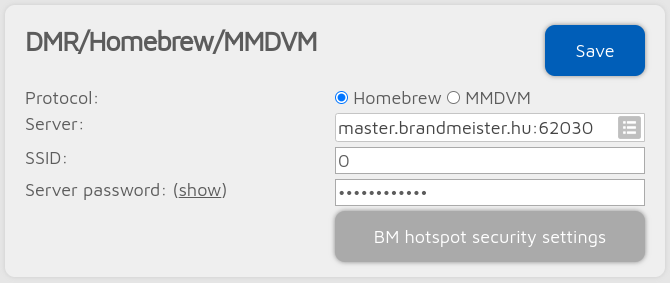
This connector supports 2 protocols: Homebrew and MMDVM®. Use the Homebrew protocol to connect to BrandMeister Network servers, and the MMDVM® protocol to connect to TGIF, DMRplus, Phoenix, DMR-MARC, XLX etc. servers.
Note
The easiest way is to use the Quick Setup menu on the device or the Quick Setup page on the web interface to set up this connector.
Note
Read more about DMR usage, talkgroup linking/unlinking here.
Connecting to a BrandMeister server
BrandMeister servers require this connector to be in Homebrew protocol mode. You can see the list of currently linked static, dynamic talkgroups and reflectors on the Status page of the web interface.
Set the Server password to the Hotspot security password you’ve set on your BrandMeister SelfCare page. Take a look at this page for more information about configuring a Hotspot security password.
If you use a BrandMeister server then the BM hotspot security settings button shows up which will take you to the BrandMeister SelfCare page.
Connecting to other servers
The default Server password for MMDVM® servers is passw0rd or password, but some servers do not use these defaults. Refer to the server’s support page for the correct password.
SSIDs
You can optionally use SSIDs to connect multiple devices to the BrandMeister Network. Use separate SSID for each of your device. This way you don’t need to have multiple DMR IDs.
As talkgroup linking/unlinking is managed entirely by the network/server based on the connected DMR ID, SSIDs can also be used to have a different set of linked talkgroups on each configuration profile.
Note
Read more about DMR usage, talkgroup linking/unlinking here.
Advanced settings
If Advanced mode is enabled, the following settings will be visible:
You can set a backup server which will be used if the device can’t connect to the primary server for Backup server activate connect timeout seconds. If the backup server is disconnected then the primary one will be tried automatically again.
You can set the TDMA channel which the M1KE will use with the DMO mode TDMA channel setting. On the BrandMeister Network the DMO mode links the two timeslots together, so this setting is irrelevant.
Auto connect
The Auto connect to ID will be quick called when the device connects to the server. Please see the Quick Call for more information about this feature.
Note
Using the auto connect feature is not needed (and not recommended) on BrandMeister, as this network supports auto static talkgroups: the first talkgroup you call after calling TG4000 will be set as auto static. These talkgroups will not be unlinked after a timeout like dynamic talkgroups (this timeout is usually 15 minutes, but this depends on server settings).
Example: start a short call to TG4000. Then start a short call to TG3100. Now TG3100 will be auto static, which means it won’t be unlinked after a timeout.
If you are using auto connect to a talkgroup, it is advisable to check the Unlink TG/ref. on auto connect checkbox. If it’s checked, the device will automatically quick call TG4000 after it is connected to the server, so the currently active TG/reflector will be unlinked. This is useful if you only want to use a talkgroup, but the server always links you to a reflector automatically.
If you set the Auto connect interval (sec) setting to a value greater than zero then auto connect will be performed periodically.
Changing modules on XLX servers
To unlink the currently linked module, call DMR ID 4000 (either using the Quick Call on the web interface, or using a transceiver). To connect to module A, call DMR ID 4001, for module B call DMR ID 4002 and so on.