SharkRF IP Connector Server

You can use this connector to accept up to 32 connections from another M1KE or openSPOT devices. You can use our open source SharkRF IP Connector Protocol Server instead of the built-in server if you want to link more devices.
The protocol’s documentation can be found on GitHub, so you can also develop your own application.
Make sure that the UDP port used by this connector (by default it’s 65100) is correctly set up on your router (it’s open on the firewall and is forwarded to the device’s IP address).
Important
PTT is disabled if more than 1 client is connected.
Client list
If this connector is active, then a menu item called SRF IPS clients will show up in the display’s main menu. This menu item lets you view the list of connected clients:

You can find this list also on the Status page on the web interface:

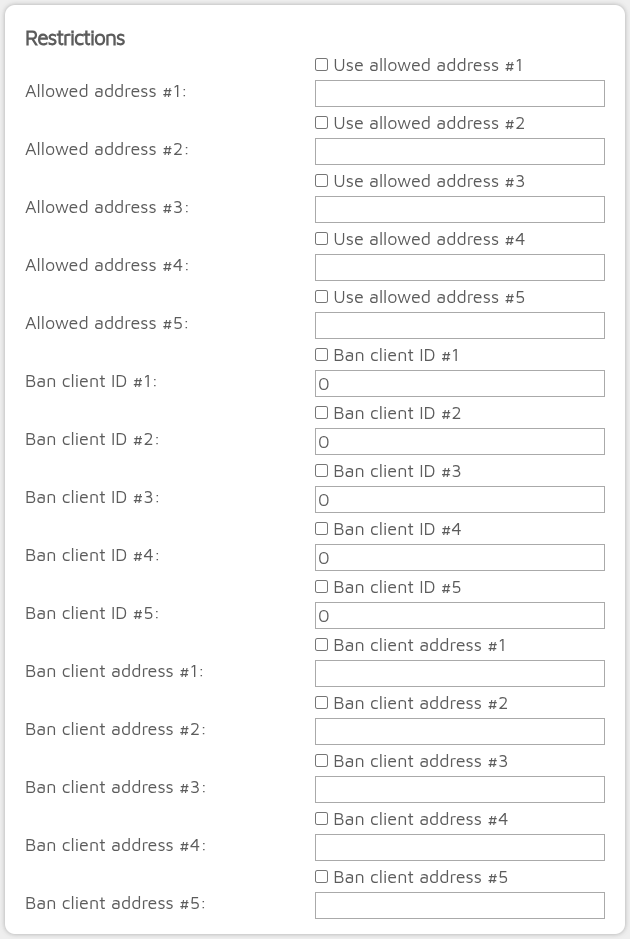
Restrictions
Note
This section is only shown if Advanced mode is enabled.
You can set the allowed/banned addresses and client IDs. You can enter IPv4 or IPv6 addresses and you can optionally specify address masks.
IPv4 address examples
192.168.3.1 (matches a unique address)
192.168.3.1/24 (matches all addresses in the 192.168.3.x range)
192.168.3.1/16 (matches all addresses in the 192.168.x.x range)
IPv6 address examples
2001:db8::1 (matches a unique address)
2001:db8:3333:4444:5555:6666:7777:8888/112 (matches all addresses in the 2001:db8:3333:4444:5555:6666:7777:x range)
2001:db8:3333:4444:5555:6666:7777:8888/64 (matches all addresses in the 2001:db8:3333:4444:x:x:x:x range)
Important
Check the checkbox above the specified address or ID to allow the restriction.
If a connecting client’s address or ID is in the banned list, then the connection will be ignored even if the address is in the allowed list. If at least one allowed address is specified, then only the allowed addresses are allowed to connect.