Mic settings page
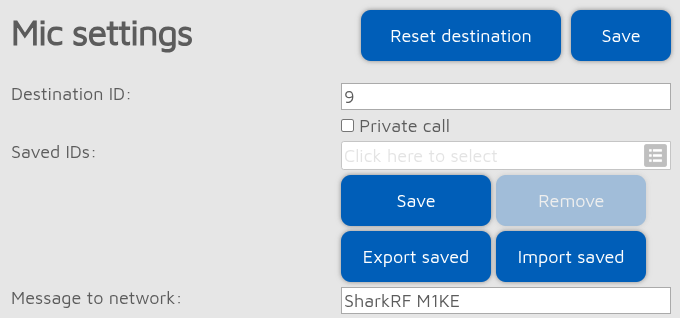
You can set the destination callsign or ID, call type (Private, or Group if the Private call option is not checked), call message of your outgoing call.
Note
The available options in this section depend on the currently active connector, as each has its own set of PTT destination settings.
Saved IDs/callsigns
You can save the current destination to the Saved IDs/callsigns list by clicking on the Save button. To remove an entry, select it from the list and then click on the Remove button.
These saved IDs/callsigns will appear as Favs (Favorites) on the PTT Destination Settings screen.
If Advanced mode is enabled, then you can export and import the saved destinations list by clicking on the Export saved and Import saved buttons.
Important
Saved PTT destinations are stored in the global storage which are common for all configuration profiles.
Note
Voice of incoming calls may stutter while the import operation is ongoing.
Audio settings

The Gain to DMR/D-STAR®/etc. network fields set the audio gain level for the microphone for each network type. These all use different audio gain levels.
The Loudness setting controls the audio compression level. The default enabled 1% state gives a good audio quality. If you have a quiet voice, you can increase the loudness level to make your voice louder.
Use the Mic gain setting to reduce the microphone gain level if you have a loud voice (set it to -6 or -12 for example).
Important
You can use the Parrot connector to test your audio settings.
Other settings
Note
This section is only shown if Advanced mode is enabled.
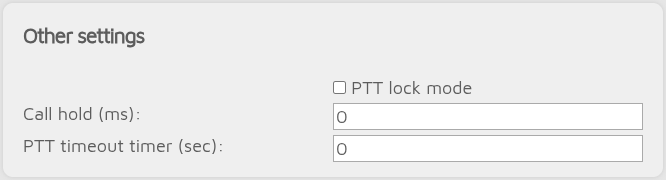
If PTT lock mode is enabled, the PTT button functions as a toggle switch: transmission continues after you release the PTT button, and pressing the PTT button again turns off transmission.
The Call hold setting specifies the time to keep the last call displayed on the device screen after the call ends.
If a DMR or NXDN® call is received from the network, this setting also specifies the Call hold reply interval.
If the PTT timeout timer setting is not zero, then the length of a transmission is limited to the specified number of seconds. After this time, the transmission is automatically ended (PTT is released). Notification beeps will sound 10 seconds before the transmission is cut off.
Audio DSP FX
Note
This section is only shown if Advanced mode is enabled.
Noise reduction
The Noise reduction setting reduces the background noise level.
Pitch
The Pitch setting changes the pitch of your voice.
Chorus
The Chorus setting adds a chorus effect to your voice.
EQ
The EQ setting changes the audio equalizer settings of your voice. Check the checkbox below Low, Mid, and High to enable modifying the corresponding audio range.
Delay
The Delay setting adds a delay effect to your voice.
Important
You can use the Parrot connector to test your audio settings.