PTT Destination Settings screen
Long pressing the Down Button on the Main screen or on the Ongoing call screen shows the PTT Destination Settings screen:
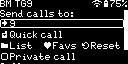
You can set the destination callsign or ID, call type (Private, or Group if the Private call option is not checked), call message of your outgoing call.
If the IAX2/AllStarLink® connector is active, then the IAX2/AllStarLink® menu will be shown instead of the PTT destination settings screen. See the IAX2/AllStarLink® connector page for more information.
Important
Changing the destination callsign does not change the currently active server. Use the Quick Setup screen to change the server.
Note
The PTT Destination Settings can also be changed on the Mic settings page of the web interface.
Note
The available options on this screen depend on the currently active connector, as each has its own set of PTT Destination Settings.
Entering the List view lets you choose a talkgroup (in case of a group call) or a remote party (in case of a private call):
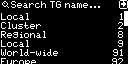
You can save the current destination to the Favs (Favorites) list by entering the Favs screen and then selecting the “Save current” option:

Saved entries can be recalled (or removed) by selecting them and choosing from the shown action dialog:

Note
The Favs list can also be edited on the Mic settings page of the web interface.