Call Log screen
Long pressing the Up Button on the Main screen or on the Ongoing call screen shows the Call Log:
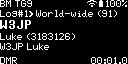
You can navigate the Call Log with the Up/Down Buttons. The Call Log can be closed with the Power/Back Button.
The Log#1 text shows that entry #1 is displayed.
The bottom right corner alternates between the call duration and the start time of the call.
Other fields share the same information as when the call was displayed previously on the Ongoing call screen.
Note
The Call Log can only store a limited number of entries.