Broadcast connector

This connector is active when the M1KE is not connected to a Wi-Fi® network.
You can use this connector to transmit to other devices which support the SharkRF Broadcast protocol:
Nearby M1KE devices (Device to Device network)
If the M1KE is connected to a Wi-Fi® network, then M1KE devices on the same network (Multicast network)
You can also remotely connect Device to Device or Multicast networks via the internet.
Broadcast neighbor list
If the Broadcast connector is active, then a menu item called Bcast neighbors will show up in the display’s main menu. This menu item lets you view the list of other M1KE devices which are nearby or are on the same network:
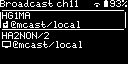
Pressing the OK/Menu Button on a neighbor lets you send a message to that device.
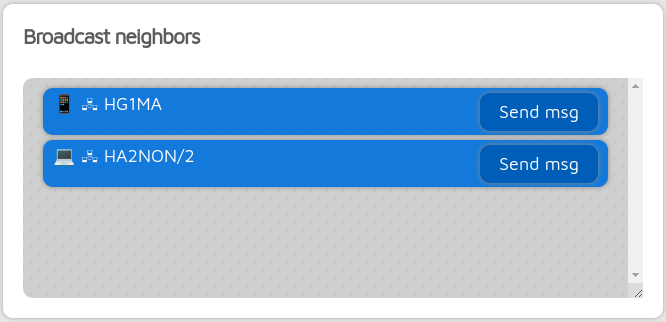
You can find this list also on the Status page on the web interface:
Broadcast connector settings
The TX codec setting determines which codec is used for transmitting audio. The M1KE is able to decode both PCM and AMBE3000.
The Encryption key setting is used to encrypt the audio stream. The same key must be used on both the transmitting and receiving devices.
Message will be shown in the neighbor list of other devices.
Device to Device network
You can talk to other devices nearby on the same channel on the Device to Device network. This network is always active.
The M1KE always listens on the Device to Device network even when it is connected to a Wi-Fi® network. If it is not connected to a Wi-Fi® network, then the channel number can be set freely. If it is connected to a Wi-Fi® network, then the channel number is set to the same as the Wi-Fi® network’s channel number.
If Advanced mode is enabled, then you can set a Filter ID. This ID must match on other devices, otherwise they won’t be able to communicate with each other.
Note
Device to Device network channels are shared with other 2.4GHz protocols like Wi-Fi® and Bluetooth. You may experience dropouts if the currently used channel is congested.
Multicast network

Note
This section is only shown if Advanced mode is enabled.
If the M1KE is connected to a Wi-Fi® network, then it can also talk to other devices on the same Wi-Fi® network.
If Advanced mode is enabled, then the following settings are visible:
You can enable/disable using the Multicast network
You can Enable forwarding to/from Device to Device networks. If you enable this, then the device acts as a gateway and forwards received data from the Device to Device network to the Multicast network, and vice versa.
Multicast group and multicast port settings must match on all devices which want to communicate with each other on the Multicast network.
You can save custom multicast groups. Each custom group entry stores multicast group address, port, TX codec, encryption key, source callsign, name and message.
Important
Make sure multicast packets are not filtered by your Wi-Fi® access point.
Important
Avoid creating loops by enabling the Enable forwarding to/from Device to Device networks setting on only one device in the network.
Sitelink network
Note
This section is only shown if Advanced mode is enabled.
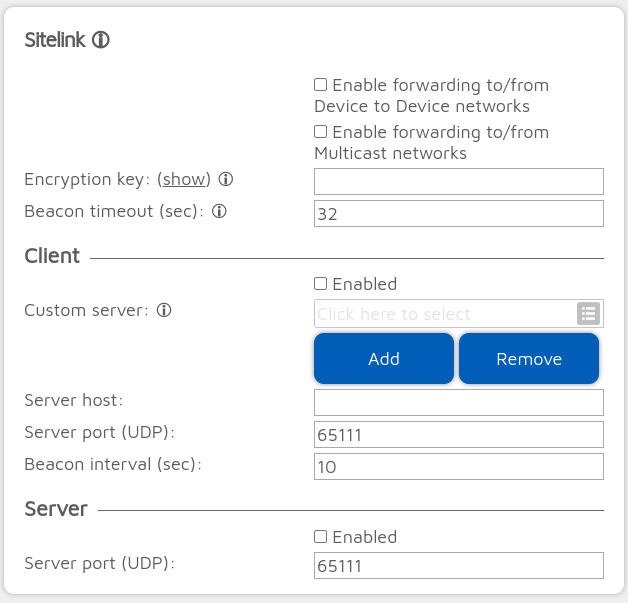
In this section you can configure the M1KE to connect Device to Device or Multicast networks via the internet. It can act as a client or a server.
If set, the Encryption key setting is applied for the Sitelink connection only and does not affect the Device to Device or Multicast network encryption.
A Sitelink client sends a beacon to the server every Beacon interval (sec) seconds. The server replies to this beacon. The Beacon timeout setting determines the timeout to consider the connection dead if no beacon or reply is received.
Note
PTT will be disabled on the device if it acts as a Sitelink server.
Important
Avoid creating loops by having only one client and server in a network.
Broadcast network example
Here’s an example of a network which consists of several M1KE devices:

Device A can talk to its neighbors over the Device to Device network
Device B is connected to Wi-Fi® network A, and it can talk to its neighbors over the Multicast network on the Wi-Fi® network
Device B is nearby Device A so they can communicate via the Device to Device network
If Device B has the Enable forwarding to/from Device to Device networks setting enabled, then others on its Multicast network can talk to Device A and other devices on the Device to Device network, so the upper part of the network graph is fully connected.
If Device B and Device C are configured as Sitelink server and client, then both networks can be connected via the internet. If Device D is also configured to forward between Device to Device and Multicast networks, then it is possible to talk between all devices on the network. For example, Device E can talk to Device A.