Config profiles screen
Note
Refer to the Configuration profiles page for more information about configuration profiles.
The currently active configuration profile can be easily switched on this screen. You can also rename or copy a profile to another profile slot.
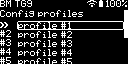
Select the profile you want to activate or edit with the Up/Down Buttons, then press the OK/Menu Button. The Edit profile screen will be displayed.
Edit profile screen
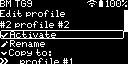
Activate
Select Activate to activate the configuration profile. The Activate menu item won’t be displayed for the currently active profile.
Note
The device reboots when activating another configuration profile. Follow the steps described at the Welcome screen to initialize a profile which has never been used before.
Rename
Select Rename to rename the configuration profile.
Copy to
Select a profile under Copy to to copy the current profile to another profile slot.