Welcome screen
After the device has been powered up, the M1KE displays the boot logo and then the initialization setup welcome screen:
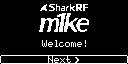
Press the OK/Menu Button to click on Next > and proceed to the next screen.
Note
You can talk to nearby M1KE devices which are on channel #1 (or other devices which support the Broadcast protocol) right now without further setup by pressing and holding the PTT (Push-To-Talk) Button.
Note
The display may get dim and be turned off when no button is pressed for a while. Press any button to wake it up.
If running on battery power, the device will power down after 3 minutes of inactivity (no button pressed) during the first initialization setup process.