Owner information screen
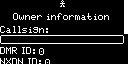
Press the OK/Menu Button to start entering your callsign:
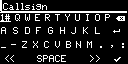
Note
See the Keyboard screen section for information on how to enter text.
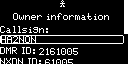
After entering your callsign, the M1KE looks up the DMR and NXDN® ID databases and fills the ID entries automatically:
Note
You can change the filled IDs by moving the cursor to the ID field and pressing the OK/Menu Button.
Navigate to the bottom of the screen with the Down Button and answer Yes or No for the valid amateur radio license question by pressing the OK/Menu Button on the respective Yes/No radio button:
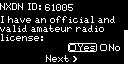
Proceed to the next screen by moving the cursor to the Next > button and pressing the OK/Menu Button.
Important
You can change the owner information later on the Owner information screen under Main Menu / Settings on the device display or at the Owner information on the Quick Setup page of the web interface.