Country screen
If you are located in the United States:
Press the Down Button and then press the OK/Menu Button to click on Next > and proceed to the next screen.

If you are not in the United States:
Press the OK/Menu Button to bring up the list of countries:
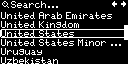
Use the Up Button and the Down Button to move the cursor and navigate the list. You can turn pages by moving the cursor to the arrows at the top right of the screen and pressing the OK/Menu Button.
Move the cursor to the country you are located in and press the OK/Menu Button. This will bring back the country screen and then you can proceed to the next screen by moving the cursor to the Next > button and pressing the OK/Menu Button.
Note
You can go back to the previous screen without selecting a country by pressing the Back Button.
Important
You can change the country of operation later on the Owner information screen under Main Menu / Settings on the device display or at the Network settings on the Network page of the web interface.