Network settings
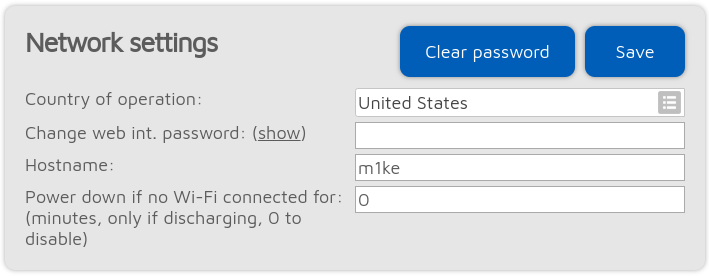
The web interface of the device is not password protected by default, which means anyone on the local network can open it. You can set a password by entering it in the Change web int. password input field. To reset the factory default behavior and clear the password, click on the Clear password button.
The Hostname is used by built-in LLMNR and MDNS server which means you’ll be able to open the web interface by entering http://hostname/ or http://hostname.local/ into the browser. The hostname is also displayed at the top right corner of the web interface.
Important
If you have multiple M1KEs on the same network, make sure you use different hostnames for each of them.
The following settings are only available if Advanced mode is enabled.
Please see the Setting the dejitter queue length section on the Dejitter queue length setting.
The Call timeout duration (ms) determines the time in milliseconds after which an ongoing call is considered as ended with a timeout (as no call end message was received).
The M1KE can send its log output to a syslog server set by the Syslog server field. Check the Send log to syslog server checkbox to enable using the syslog server.