Display settings screen
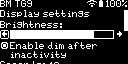
This screen lets you change the display settings of the device.
Brightness
Reducing the brightness of the display can help save battery power.
The Enable dim after inactivity checkbox allows you to enable or disable the automatic dimming of the display after a period of inactivity. You can set the time after which the display will dim by adjusting the Seconds setting below the checkbox.
The Enable turn off display after dim checkbox allows you to enable or disable the automatic turning off of the display after it has dimmed. You can set the time after which the display will turn off by adjusting the Seconds setting below the checkbox.
Keypad lock
You can set which set of buttons the Keypad Lock affects here.